
G555 Game registration and login are the first steps for users who want to explore the platform and its available gaming features. Before creating an account, it is important to understand the registration process, required details, login steps, and basic security practices.
This guide explains how to register on G 555, access an existing account, recover a forgotten password, and resolve common login problems. Whether you are a new user or returning to your account, following these steps can help you avoid common mistakes and manage your account more carefully.
What Is G555 Register and Login?
G555 Game Register is the account creation process for new users, while the Game Login allows registered users to access their existing accounts. Registration usually involves completing a form with the information requested by the platform and creating a password.
Once an account has been created successfully, users can log in using their registered credentials. The exact registration fields and verification requirements may vary depending on the current version of the website or application.
Requirements Before Registering on G555
Before starting the G555 Game registration process, prepare the following:
- A compatible device: Use a mobile phone, tablet, or computer with a supported browser.
- Internet connection: A stable connection helps prevent registration interruptions.
- Valid contact details: Use your own mobile number or email address if requested.
- A strong password: Create a unique password that you do not use on other websites.
- Verification access: Keep access to your registered phone or email if the platform requests a verification code.
- Terms and conditions: Read the applicable rules, privacy policy, and eligibility requirements before creating an account.
Only provide information requested through a website you have independently verified. Never share your password or one-time verification code with another person.
How to Register on G555 Game
Follow these general steps to create a new Game account.
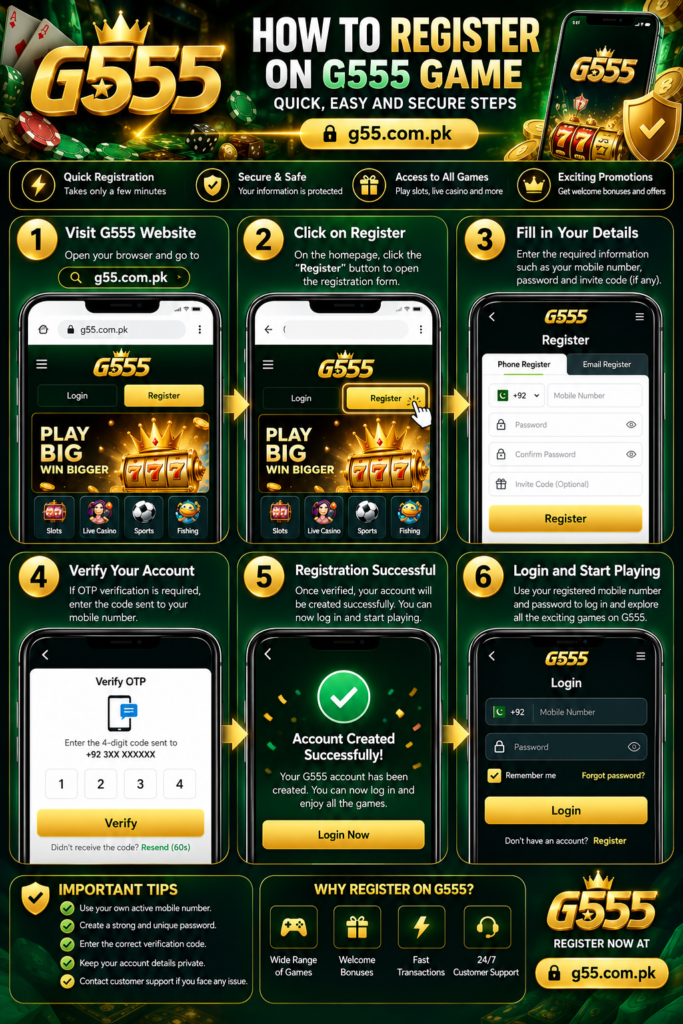
Step 1: Visit the G555 Website
Open your browser and enter g55.com.pk in the address bar. Check the spelling of the domain carefully before entering any personal information.
Step 2: Find the Register Button
Look for the Register, Sign Up, or Create Account option on the homepage. Select it to open the account registration form.
Step 3: Enter the Required Information
Complete the fields displayed on the registration page. Depending on the current form, these may include a mobile number, username, email address, or other requested details. Make sure the information is accurate. Incorrect contact details can make account recovery and verification more difficult later.
Step 4: Create a Strong Password
Choose a unique password that combines uppercase and lowercase letters, numbers, and symbols where supported. Avoid using easily guessed information, such as your name or date of birth. Do not reuse a password from your email, banking application, or other important account.
Step 5: Complete Verification if Required
Some registration forms may request a one-time password (OTP), email confirmation, or another verification step. If prompted, follow the instructions shown on the verified website. Never share an OTP with someone claiming to be a support representative.
Step 6: Submit Your Registration
Review the information you entered and submit the form. If registration is successful, follow any on-screen instructions to access your account. If an error appears, read the message carefully before trying again. Avoid creating multiple accounts to work around a registration problem.
How to Login to G555 Game
If you already have a account, you generally do not need to register again. Use the login process to access your existing profile.
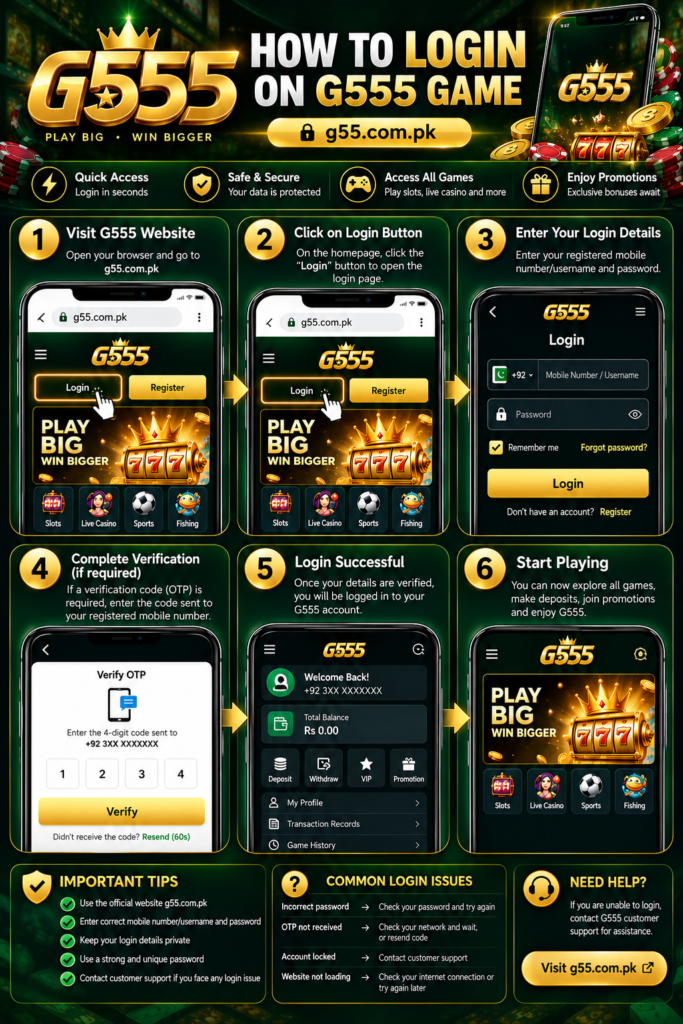
- Open the verified G555 website at g55.com.pk.
- Select the Login or Sign In option.
- Enter the username, mobile number, or email address requested by the login form.
- Enter your account password.
- Complete any additional verification if prompted.
- Select the Login button to continue.
If your credentials are correct and the service is working normally, you should be able to access your account.
Always check that you are using the correct website before entering your login details. Avoid logging in through links received from unknown messages or unofficial social media accounts.
G555 Game Login on Mobile
Many users prefer accessing gaming platforms through their mobile phones. The login process is generally similar to using a computer, although the page layout may be different.
To log in on mobile:
- Open your preferred browser.
- Enter the verified website address.
- Tap Login.
- Enter your registered credentials.
- Complete any required verification.
- Check that your account opens successfully.
If an official mobile application is offered, verify its source before downloading it. Avoid installing APK files from unknown websites, as they may contain harmful software or attempt to collect personal information.
G555 Game Login Problems and Solutions
Users may sometimes experience difficulties while trying to register or log in. The following table explains common issues and practical steps to try.
| Problem | What to do |
|---|---|
| Incorrect password | Check for typing errors and confirm that caps lock is not enabled. |
| Wrong mobile number or username | Use the exact contact detail or username associated with your account. |
| OTP not received | Check your contact details, network connection, and spam folder where applicable. |
| Registration form not submitting | Review required fields and check your internet connection. |
| Website not loading | Try again later or check your connection and browser. |
| Account temporarily restricted | Follow the displayed instructions or contact verified support. |
| Forgotten password | Use the password recovery option if available. |
If the issue continues, contact the platform through a support channel you have independently verified. Never pay an unofficial individual to unlock an account or recover a password.
How to Reset a Forgotten G555 Game Password
Forgetting a password can prevent access to an existing account. If the login page provides a password recovery option, follow these steps.
- Open the G555 login page.
- Select Forgot Password, if available.
- Enter the contact detail requested by the recovery form.
- Follow the official recovery instructions.
- Complete the verification process if required.
- Create a new, unique password and use it to log in.
If you no longer have access to your registered phone number or email, contact verified support for guidance. Do not share your current password or verification codes during the recovery process.
How to Keep Your G555 Account Secure
Account security is important whenever a website collects personal information or provides access to payment-related features. Follow these practices to reduce avoidable risks.
- Use a unique password: Do not use the same password across multiple platforms.
- Protect verification codes: Never share OTPs or account recovery codes.
- Check the domain: Confirm the website address before signing in.
- Avoid public devices: If you use a shared computer, log out when finished.
- Keep your device updated: Install browser and operating system updates from trusted sources.
- Review account activity: Check available account records for unfamiliar activity.
- Verify payment details: If the platform offers payment services, review the details carefully before confirming a transaction.
- Be careful with downloads: Use only verified application sources.
These practices can improve account security, but they cannot guarantee that a platform or transaction is completely safe.
What Happens After G555 Game Login?
After logging in, users may be able to access the sections available to their account. Depending on the platform’s current features, these may include:
- Game lobby: Browse available games and categories.
- Account profile: Review or update supported account information.
- Wallet section: View the balance or transaction options if provided.
- Promotions: Read the conditions of any available offers.
- Transaction records: Review deposit or withdrawal status if this feature is available.
- Support section: Find assistance for account-related issues.
The available features depend on the actual website and its current services. Read the applicable terms before using payment or promotional features.
Important Things to Know Before Using G555 Game
Before creating an account, review the platform’s terms, privacy policy, age restrictions, and legal requirements that apply to you. Do not assume that registration automatically confirms the platform’s legitimacy, licensing, or security.
If the platform involves real-money gambling, remember that outcomes are uncertain and losses are possible. Winnings are never guaranteed, and gambling should not be treated as a reliable source of income. Participate only where legally permitted and within limits you can afford.
Frequently Asked Questions
How do I register on G555 Game?
Visit the verified website, select Register, complete the requested fields, create a strong password, and follow any verification instructions displayed by the platform.
How do I log in to G555 Game?
Open the login page, enter the credentials associated with your account, complete any required verification, and submit the form.
Can I register on my mobile phone?
You can generally complete website registration using a compatible mobile browser if the registration page supports mobile devices.
What should I do if I forget my G555 password?
Use the Forgot Password option if available and follow the official recovery instructions. Contact verified support if you cannot access your registered contact details.
Why am I not receiving my OTP?
Check that your registered contact information is correct and that your device can receive messages. Wait briefly before requesting another code, and follow the website’s instructions.
Is G555 Game registration free?
Check the registration page and applicable terms for any fees or requirements. Do not assume that registration, deposits, or gaming activities have identical conditions.
Can I use the same account on multiple devices?
This depends on the platform’s account rules. Review its terms and avoid sharing credentials with other people.
Is it safe to download the G555 APK?
Only consider an application if its source and authenticity can be independently verified. Unknown APK files may pose privacy and security risks.
Conclusion
The G555 Game register and login process generally involves opening the website, completing the registration form or entering existing credentials, and following any required verification steps. Using accurate information and a strong password can help reduce common account access problems.
Before using additional features, review the platform’s terms, privacy policy, and payment conditions. Always protect your login credentials, verify the website address, and make informed decisions when using online gaming services.